Prompt to Generate UI Realistic Other Use Cases for GPT-4o
Prompt to Generate UI Realistic Other Use Cases for GPT-4o is a verified PROMPT blueprint on Promptally in Visual Art & Image Generation optimized for leading AI models. High-performance Prompt to Generate UI Realistic Other Use Cases for GPT-4o prompt blueprint. Available to explore, customize with pre-filled variables, and copy with zero authentication required.
 Created by @promptally
Technical Specifications
| Specification | Value |
|---|---|
| Artifact type | PROMPT (Visual Art & Image Generation) |
| Compatible engines | Universal / Model Agnostic |
| Input variables | None (pre-filled) |
| Approximate tokens | 710 |
| Source file | prompt-prompt-to-generate-ui-realistic-other-use-cases-for-gpt-4o-1.txt |
| Access tier | Free public (MIT) |
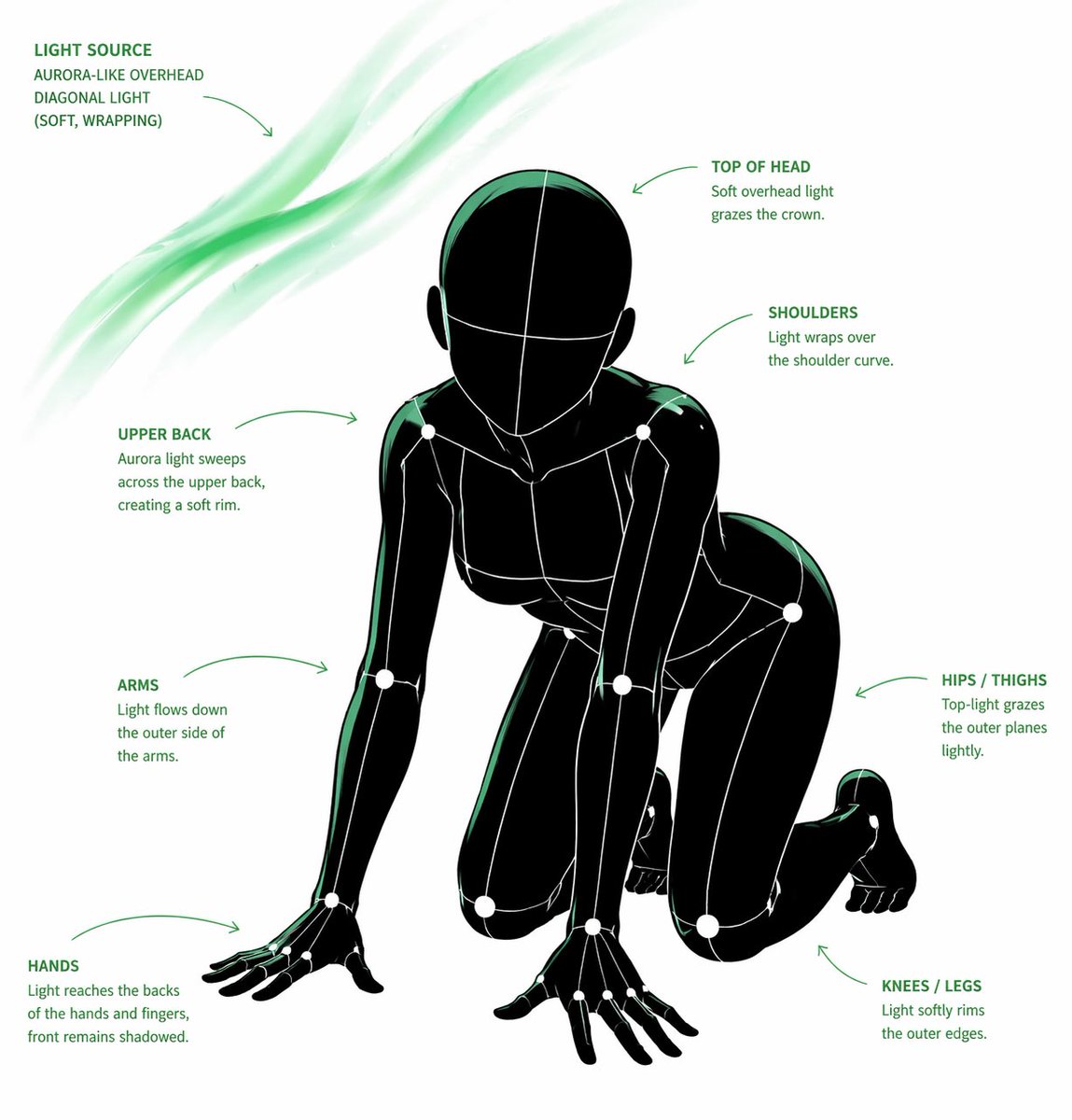
Pre-Filled Template
{{CORE_TASK}}
Transform the provided input image into a pose-and-light analysis sheet.

This is NOT a finished character illustration.
This is NOT a clothing sheet.
This is NOT a beauty-preserving redraw.

This is a white-line rough mannequin conversion.

{{PRIMARY_GOAL}}
Extract and visualize only:
- pose structure
- body balance
- camera angle
- body line flow
- inferred light source placement
- illuminated areas and light intensity

{{INPUT_ROLE}}
Use the provided image as the strict anchor for:
- pose
- camera angle
- body tilt
- weight distribution
- approximate lighting situation

Do NOT preserve:
- face rendering
- hairstyle rendering
- clothing detail
- accessories
- weapon detail
- background architecture
- character identity
- emotional expression

{{FIGURE_CONVERSION}}
single rough mannequin-like human figure
white body contour lines
white internal construction lines
simple mannequin head
no face
no eyes
no mouth
no eyelashes
no personality
no individual identity

human figure should look like:
- rough pose mannequin
- anatomy proxy
- line-based body guide
- structural sketch
- white-line rough dummy

keep:
- pose readability
- silhouette flow
- head tilt
- torso direction
- pelvis direction
- limb placement

{{BACKGROUND}}
pure black background
negative-style dark field
no scenery
no props
no architecture
no environmental storytelling

{{LINE_STYLE}}
rough white line drawing
clean but sketch-like
construction-line feeling
anatomy guide lines visible
joint flow visible
body contour emphasized
no polished illustration finish

{{LIGHT_ESTIMATION}}
predict the likely light source positions from the input image
visualize the light sources and illuminated areas using green glow only

use green light intensity with variation:
- strongest green where the light directly hits
- medium green for wrap light
- soft green for reflected or fading light

mark the estimated light sources with labels and arrows such as:
- Main Light
- Rim Light
- Fill Light
- Floor Bounce
- Back Light
only if appropriate

IMPORTANT:
do not invent random lights
infer lighting from the original input image
if the lighting is ambiguous, keep the annotations simple and plausible

{{GREEN_LIGHT_VISUALIZATION}}
show green glow on:
- head / skull plane
- neck
- shoulders
- chest plane
- ribcage direction
- pelvis edge
- thigh planes
- knee contact points
- floor contact bounce if applicable

use green light not as decoration,
but as lighting analysis information

{{POSE_PRIORITY}}
1. preserve pose structure
2. preserve camera angle
3. preserve body balance
4. preserve head-torso relationship
5. visualize likely light direction
6. show illuminated areas with readable green intensity variation

{{NEGATIVE}}
finished person,
cute girl,
detailed face,
hair rendering,
clothing rendering,
weapon emphasis,
beautiful anatomy
How to use this prompt
- Review the pre-filled example and source files above.
- Copy the template or download
prompt-prompt-to-generate-ui-realistic-other-use-cases-for-gpt-4o-1.txt, then use it in your model, IDE, or workflow tool. - Compare your result with the sample output when one is provided.
Frequently Asked Questions
How do I use Prompt to Generate UI Realistic Other Use Cases for GPT-4o?
Open the prompt on Promptally, review the pre-filled example, then copy the template or download prompt-prompt-to-generate-ui-realistic-other-use-cases-for-gpt-4o-1.txt and paste it into your model, IDE or workflow tool. Prompt to Generate UI Realistic Other Use Cases for GPT-4o is a static blueprint with no dynamic variables. Copy it and use it as-is.
Is Prompt to Generate UI Realistic Other Use Cases for GPT-4o free?
Yes. Prompt to Generate UI Realistic Other Use Cases for GPT-4o is free to view, copy and download on Promptally without creating an account. It is published under the MIT license.
What variables does Prompt to Generate UI Realistic Other Use Cases for GPT-4o need?
Prompt to Generate UI Realistic Other Use Cases for GPT-4o is a static blueprint with no dynamic variables. Copy it and use it as-is.