Prompt to Generate UI Poster UI & Interfaces for GPT-4o
Prompt to Generate UI Poster UI & Interfaces for GPT-4o is a verified PROMPT blueprint on Promptally in Visual Art & Image Generation optimized for leading AI models. High-performance Prompt to Generate UI Poster UI & Interfaces for GPT-4o prompt blueprint. Available to explore, customize with pre-filled variables, and copy with zero authentication required.
 Created by @promptally
Technical Specifications
| Specification | Value |
|---|---|
| Artifact type | PROMPT (Visual Art & Image Generation) |
| Compatible engines | Universal / Model Agnostic |
| Input variables | None (pre-filled) |
| Approximate tokens | 306 |
| Source file | prompt-prompt-to-generate-ui-poster-ui-interfaces-for-gpt-4o-7.txt |
| Access tier | Free public (MIT) |
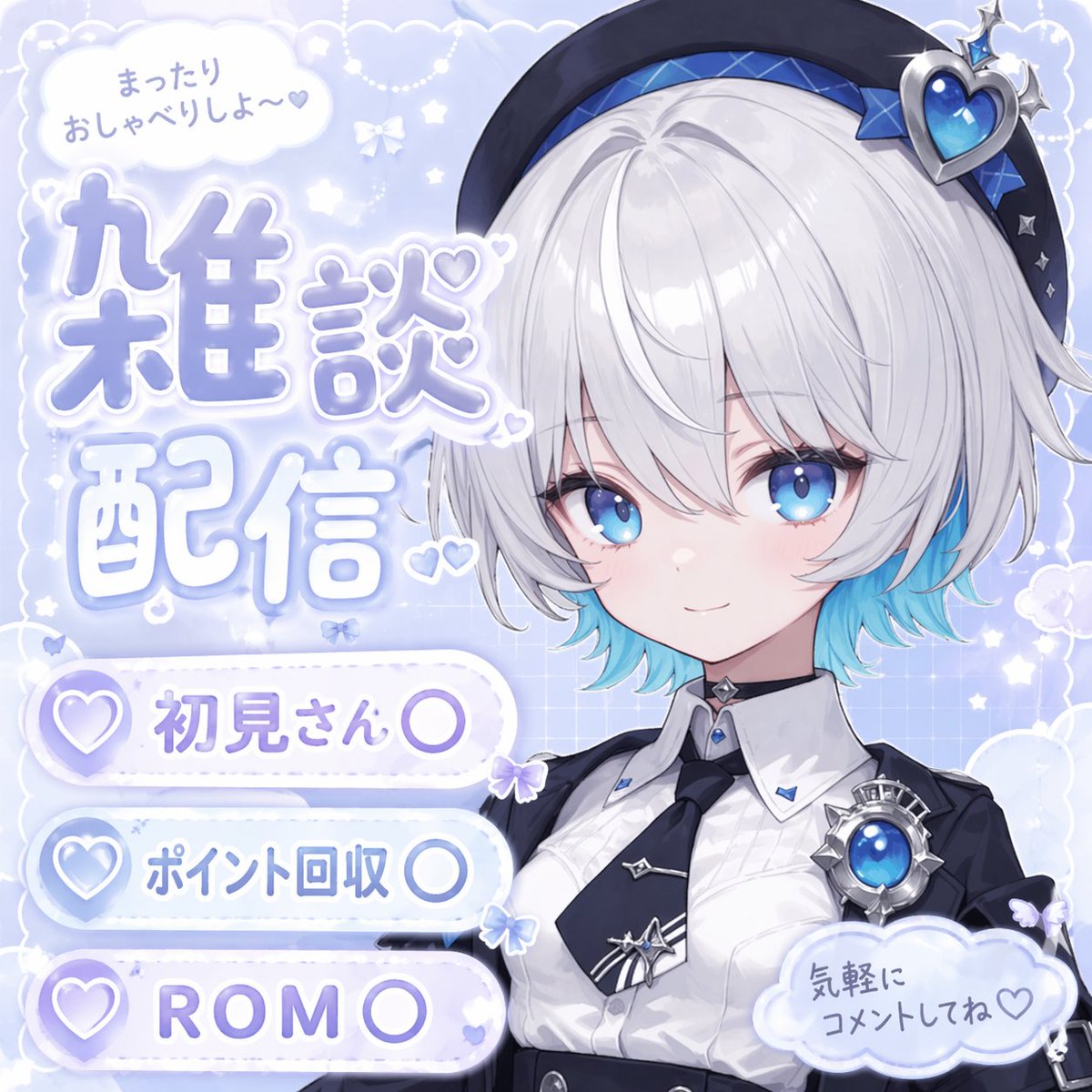
Pre-Filled Template
{
  "type": "anime-style livestream thumbnail",
  "character": {
    "hair": "{argument name=\"hair color\" default=\"short silver hair with cyan underlights\"}",
    "eyes": "large bright blue",
    "outfit": "white collared shirt, black tie with silver accents, black jacket, black beret with a large blue heart jewel, blue jewel brooch, black choker",
    "pose": "smiling gently, looking at viewer, positioned on the right side"
  },
  "background": "pastel blue with white clouds, sparkles, stars, small bows, and a subtle grid pattern",
  "typography_and_ui": {
    "top_left_speech_bubble": "まったりおしゃべりしよ〜♡",
    "main_title": {
      "text": "{argument name=\"main title\" default=\"雑談配信\"}",
      "style": "large, soft blue gradient, white outline, decorated with small hearts, positioned on the middle-left"
    },
    "bottom_left_badges": {
      "count": 3,
      "style": "white pill-shaped buttons with a purple heart icon on the left",
      "labels": [
        "{argument name=\"badge 1 text\" default=\"初見さん〇\"}",
        "{argument name=\"badge 2 text\" default=\"ポイント回収〇\"}",
        "{argument name=\"badge 3 text\" default=\"ROM〇\"}"
      ]
    },
    "bottom_right_cloud_bubble": "気軽にコメントしてね♡"
  }
}
How to use this prompt
- Review the pre-filled example and source files above.
- Copy the template or download
prompt-prompt-to-generate-ui-poster-ui-interfaces-for-gpt-4o-7.txt, then use it in your model, IDE, or workflow tool. - Compare your result with the sample output when one is provided.
Frequently Asked Questions
How do I use Prompt to Generate UI Poster UI & Interfaces for GPT-4o?
Open the prompt on Promptally, review the pre-filled example, then copy the template or download prompt-prompt-to-generate-ui-poster-ui-interfaces-for-gpt-4o-7.txt and paste it into your model, IDE or workflow tool. Prompt to Generate UI Poster UI & Interfaces for GPT-4o is a static blueprint with no dynamic variables. Copy it and use it as-is.
Is Prompt to Generate UI Poster UI & Interfaces for GPT-4o free?
Yes. Prompt to Generate UI Poster UI & Interfaces for GPT-4o is free to view, copy and download on Promptally without creating an account. It is published under the MIT license.
What variables does Prompt to Generate UI Poster UI & Interfaces for GPT-4o need?
Prompt to Generate UI Poster UI & Interfaces for GPT-4o is a static blueprint with no dynamic variables. Copy it and use it as-is.